


How to build a prompt query
Build a prompt query that specifies fixed residues, designable positions, sequence length, and structural constraints for protein generation.
A prompt is an input that directs the model to produce the desired protein sequences. It is made up of two components, a context and a query. This guide will show you how to create a query to define the explicit sequence and structure constraints for generative models like PoET-2, ProteinMPNN, or RFdiffusion2. Specify which amino acids must remain fixed, which positions can change, and whether a backbone should guide generation.
For background, see the concepts page on Prompt–Context and Prompt — Query. To guide generation toward a protein family, refer to How to build a prompt context.
Before starting
-
Decide on a design goal, such as redesigning selected positions, preserving a functional motif, or generating sequences for a backbone.
-
Have a reference sequence, a structure file, or a desired sequence length.
-
Identify any residues whose identities must remain fixed.
Setup
Choose the information to include in the query:
-
Sequence constraints: Preserve specified amino acids and generate the masked positions.
-
Structure constraints: Supply backbone coordinates to guide sequence generation.
-
Combined constraints: Preserve specified amino acids while designing the remaining sequence for a supplied backbone.
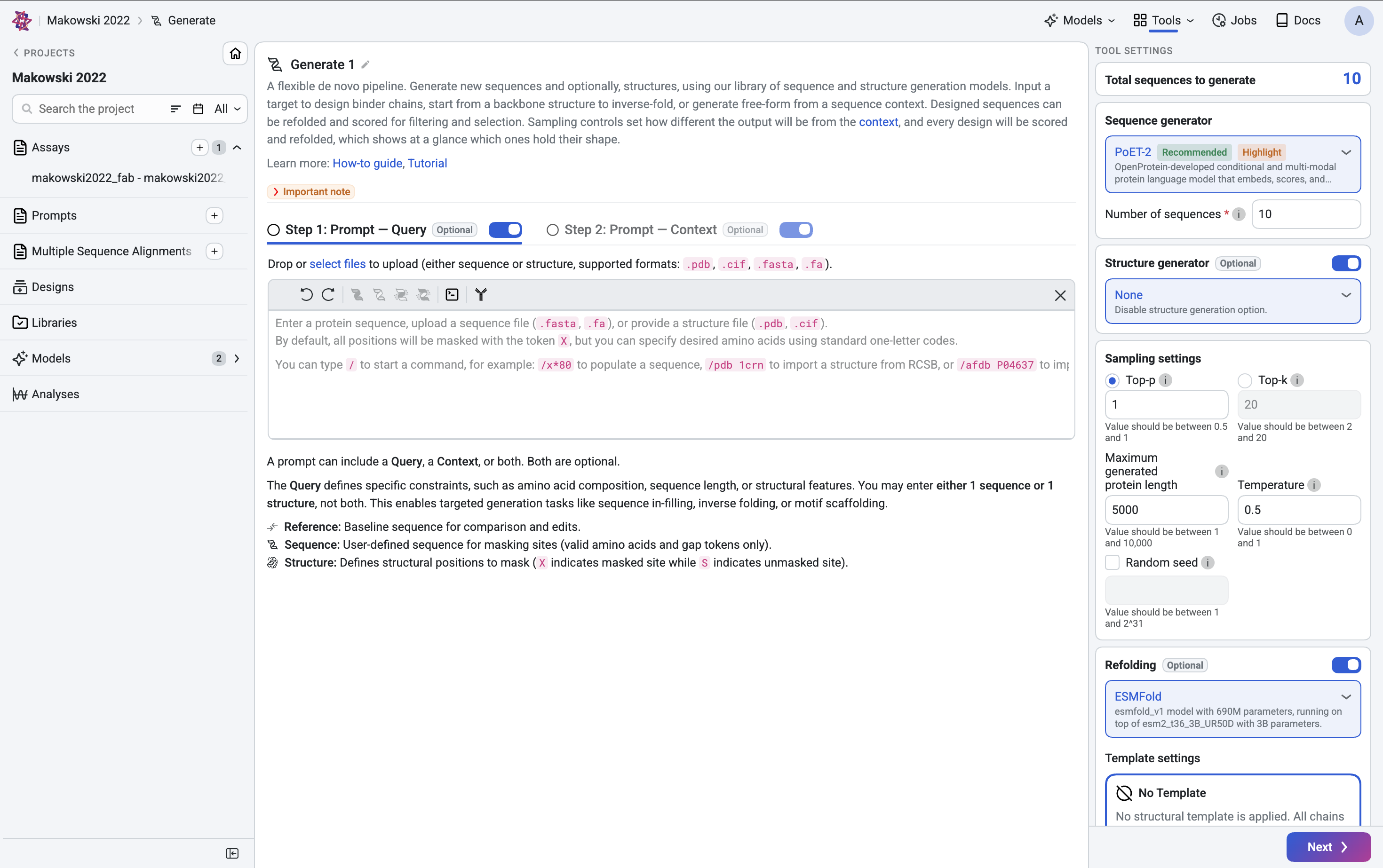
Open any of the tools that allow specifying a prompt query. For example, using Generate Sequences with PoET-2 optionally takes an input query for specifying which parts of a sequence to generate. Use the query editor to enter the sequence or upload a structure.
Load the reference
Choose a reference that matches the intended design region. Remove expression tags or unrelated domains when they fall outside the goal.
For structure-conditioned design, check that the relevant regions have backbone coordinates. Obtain or model missing coordinates before using those regions as structural constraints.
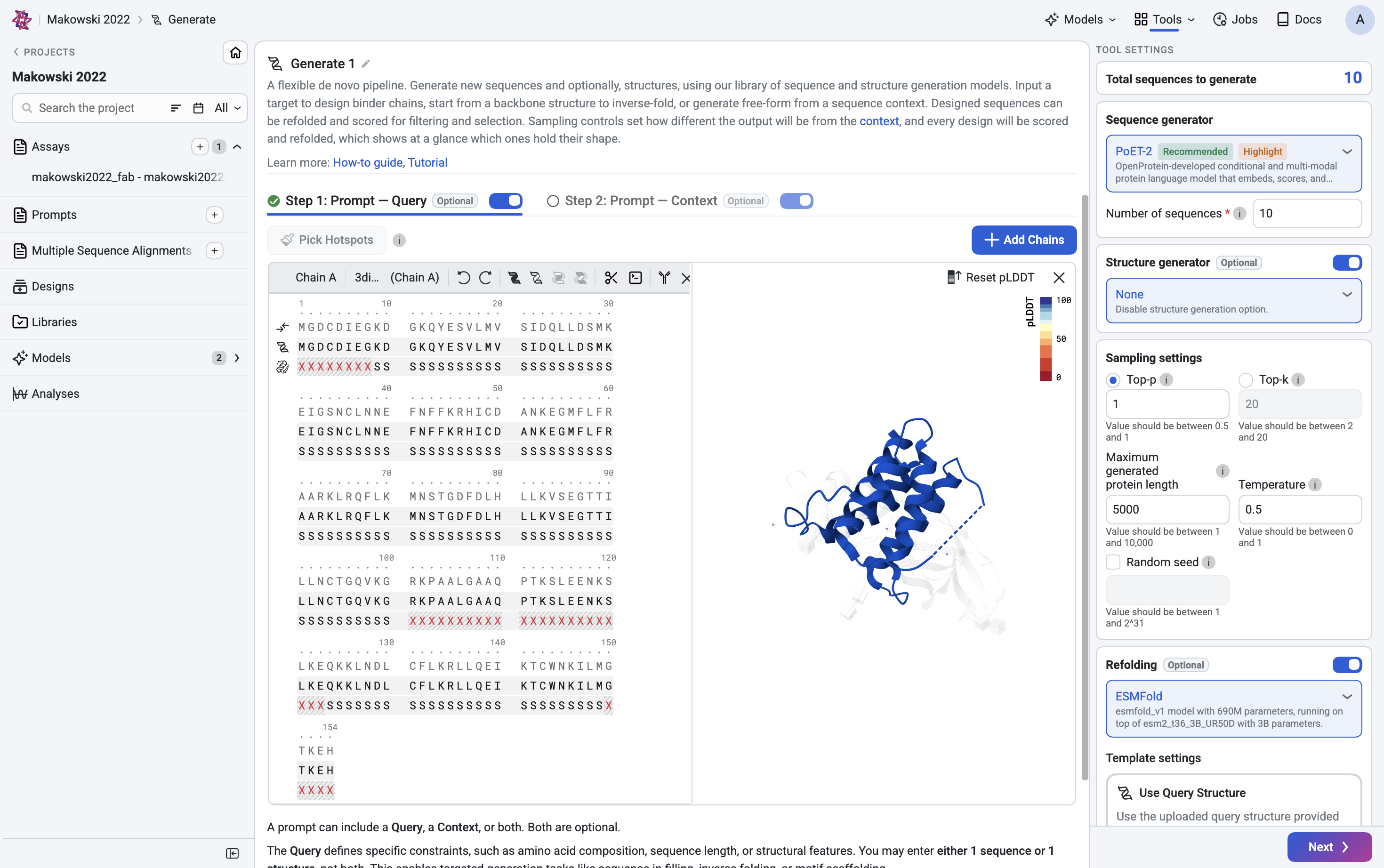
Paste a sequence into the query editor, upload a FASTA file, or upload a .pdb or .cif structure file. Check the sequence length and retain the intended chains. Delete specific residues in the sequence or structure by selecting them in the query editor and pressing the “delete” key; deleted residues will be replaced with “-”.
Define which sequence positions can change
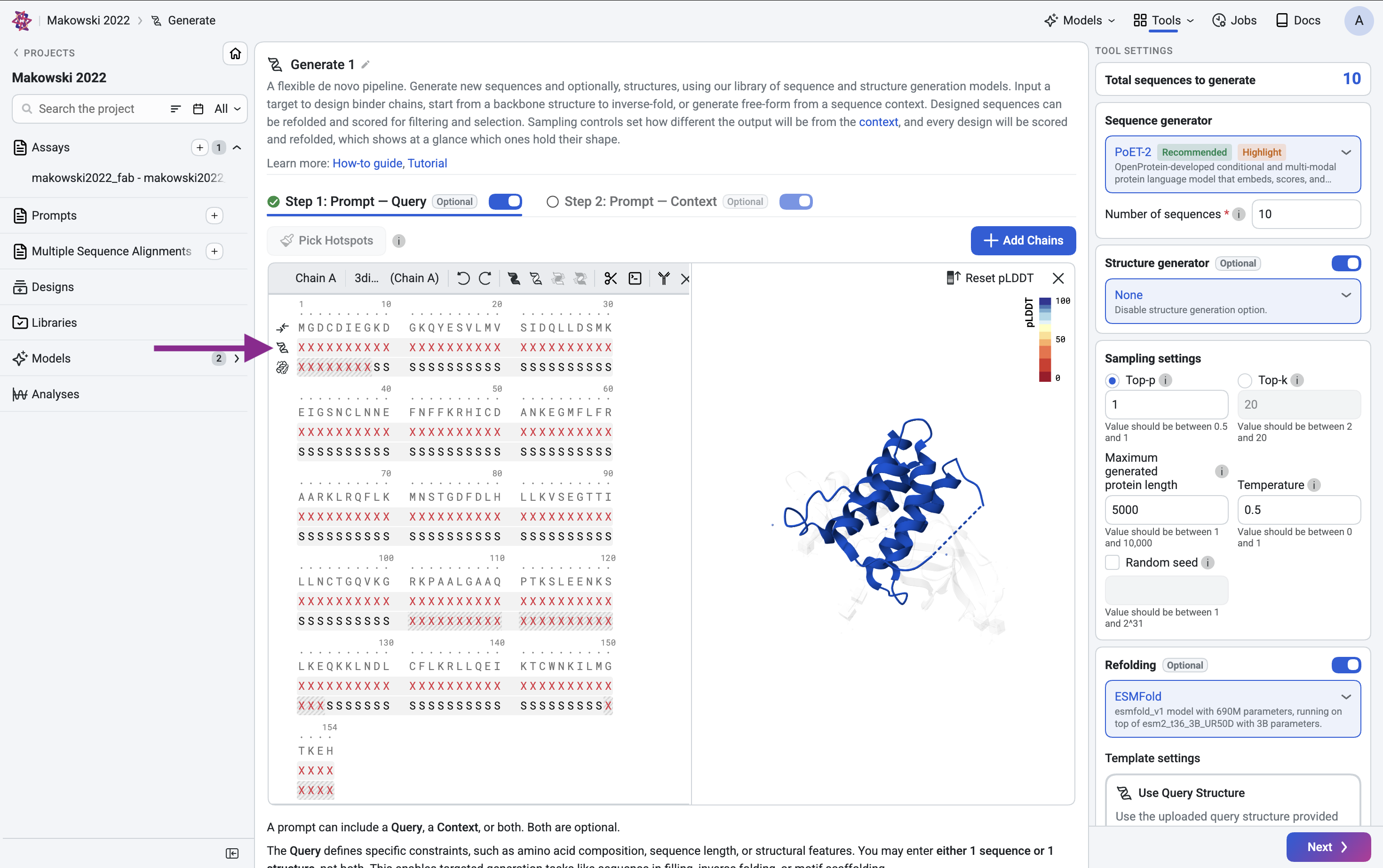
Choose the scope of redesign by masking positions allowed to vary:
-
Selected positions: Mask individual sites or a region while retaining the surrounding sequence. For example, we might choose to redesign just the complementary determining regions (CDRs) of an antibody sequence.
-
All positions except a fixed set: Preserve catalytic residues, motifs, or other required identities while redesigning the remainder.
-
The entire sequence: Mask every position when no amino acid identities need to remain fixed.
NOTE: When using the API, residues are numbered starting from 1, which follows the canonical mmcif residue id system (label_seq_id), and not the author id system (auth_seq_id).
Replace designable positions with X to mask them. Leave required amino acids unchanged. Use Mask Selected Residues, Mask Unselected Residues, or Mask Query Sequence, as appropriate.
Choose whether to retain structural constraints
Retain the backbone when the goal is to generate sequences for a specified fold, essentially an inverse folding problem. Use a sequence-only query when the goal is sequence infilling without requiring a particular backbone.
For combined constraints, retain the backbone and leave required amino acid identities unmasked.
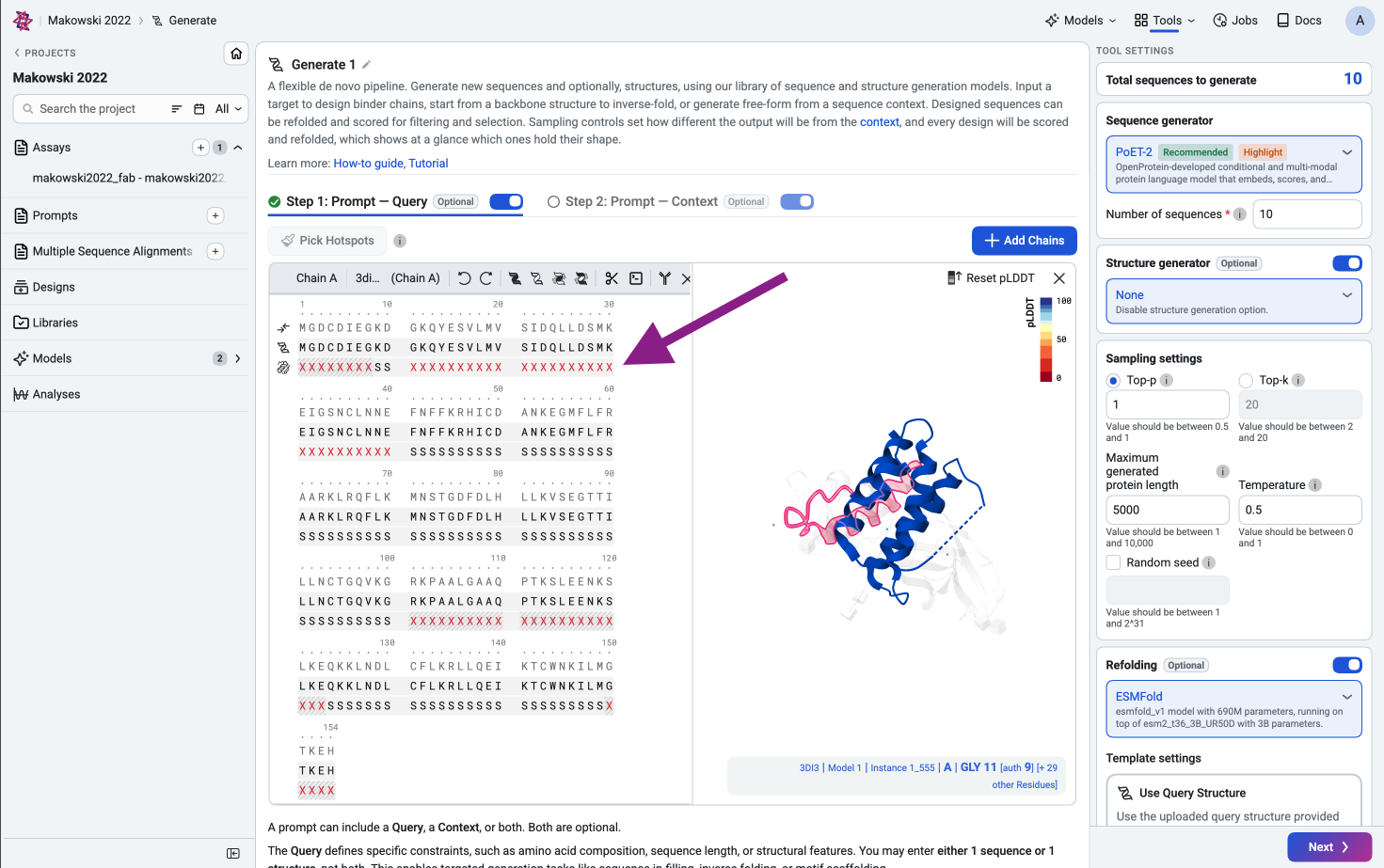
Masking sequence and masking structure are separate operations. An X in the sequence marks an amino acid to generate; removing its structural coordinates removes information that would otherwise guide that generation.
Set the structure track to X at residues where we do not want the sequence generated to be constrained by the backbone structure; otherwise, keep it as S.
Define a length-only query when no reference is needed
Use a length-only query when the desired sequence length is known but no specific residue identities or backbone coordinates need to be specified.
Use a context to guide the protein family or characteristics represented in generation.
In the query input box, to specify a masked sequence of desired length for de novo generation, type slash / followed by the command X*<desiredLength>.
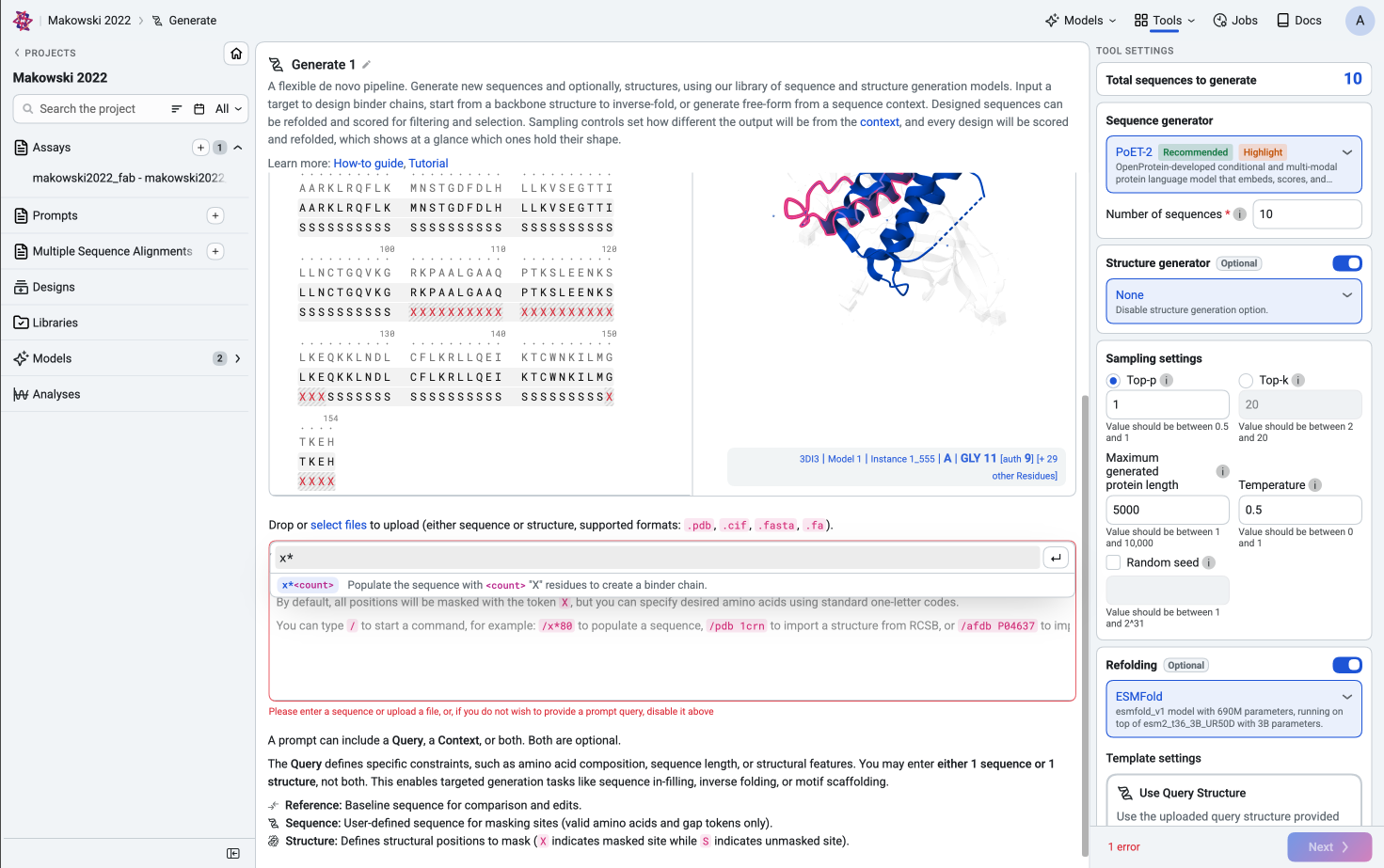
Verify the constraints
Check the query before submission:
-
Confirm the sequence length and intended chain composition.
-
Confirm that every designable position is masked.
-
Confirm that required residue identities remain unchanged.
-
For structure-conditioned design, confirm that the intended backbone coordinates remain available.
-
Recheck positions after trimming or editing the reference.
Compare the query sequence with the reference. For structural inputs, inspect the structure track and viewer to check that sequence masking has not removed the backbone.
Create and reuse the query
Retain the query alongside its reference and design specification. Reuse it when comparing contexts or sampling settings so that the explicit constraints remain consistent.
Keep the verified query loaded in the generation task. Select a context separately if needed, then proceed to sampling settings.